


 Lifetime - Access
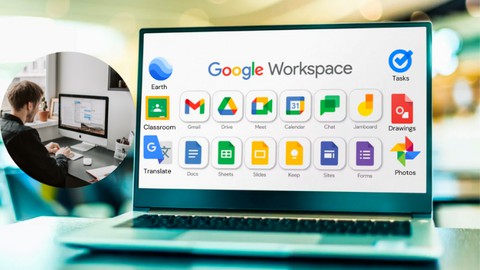

Google Workspace Applications: A Complete Guide
Master Google Workspace with this comprehensive guide. Learn how to use Gmail, Drive, Docs, Meet, and more to boost productivity and collaboration.

Created By Dr. Rasheed


Get this course with 2000+ of our top related courses with personal plan.
Try Personal Plan for freeWhat You'll Learn
- Overview of Google Workspace: Dive into Gmail, Google Drive, Docs, Sheets, and Slides.
- Explore Meet, Calendar, Forms, Chat, and Sites to enhance team collaboration.
- Master Keep, Drive for Desktop, Jamboard, Contacts, and Translate for smooth workflow management.
- Discover Earth, Drawings, Photos, Tasks, and Classroom to manage tasks and create dynamic visuals.
- How to use Gmail: Learn efficient email management and productivity tools.
- How to use Google Drive: Organize, share, and collaborate effortlessly on documents.
- How to use Google Drive for Desktop: Maximize desktop synchronization and access.
- How to use Google Docs, Sheets, and Slides: Create and edit documents, spreadsheets, and presentations with ease.
- How to use Google Meet: Conduct seamless virtual meetings and collaborate in real-time.
- How to use Google Calendar: Manage your schedule and set reminders efficiently.
- How to use Google Forms: Create surveys and collect valuable data.
- How to use Google Chat: Foster communication and teamwork within your organization.
- How to use Google Keep: Simplify note-taking and task management.
- How to use Google Sites: Build professional websites effortlessly.
- How to use Google Jamboard: Foster creative brainstorming and collaboration in teams.
- How to use Google Contacts: Manage and organize your contacts effectively.
- How to use Google Translate: Break language barriers and enhance communication with ease.
- How to use Google Earth: Explore and visualize geographic data.
- How to use Google Photos: Organize and share photos and videos seamlessly.
- How to use Google Tasks: Stay organized and manage your to-do lists effectively.
- How to use Google Classroom: Create a virtual classroom for teaching and learning.
- How to use Google Drawings: Bring your concepts and ideas to life visually.
Requirements
- Access to a computer with an internet connection.
- Basic computer skills are recommended, but no prior knowledge of Google Workspace is required.
- A Google account to access and use the various Google Workspace applications.
Course Description
Welcome to the complete guide for mastering Google Workspace! Whether you're a student, academic, or professional, this course is designed to equip you with the skills and knowledge needed to effectively use Google Workspace applications:
- Course Introduction: Understand the scope and benefits of Google Workspace.
- Overview of Google Workspace Applications: Explore the main tools including Gmail, Google Drive, Docs, Sheets, Slides, Meet, and more.
- Hands-On Training: Learn step-by-step how to use each application to maximize your productivity and collaboration.
- Advanced Features: Discover shortcuts, templates, and time-saving tips to streamline your workflow.
- Final Review: Test your knowledge with quizzes and practical exercises to solidify your learning.
By the end of this course, you will be proficient in using all the key Google Workspace applications to improve your efficiency and collaborate seamlessly with others. Get ready to enhance your skills and take your productivity to the next level!
Who This Course is For
This course is perfect for beginners and anyone who wants to boost their productivity using Google Workspace. It’s ideal for students, professionals, and small business owners looking to optimize their workflow using Google tools.
Course content

 1. Course Introduction
2. What is Google Workspace?
3. General Overview 1-5
4. General Overview 5-10
5. General Overview 10-15
6. General Overview 15-20
7. How to use Gmail
8. How to use Google Drive
9. How to use Google Drive for Desktop
10. How to use Google Docs
11. How to use Google sheets
12. How to use Google Slides
13. How to use Google Meet
14. How to use Google Forms
15. How to use Google keep
16. How to use Google Translate
17. How to use Google Calendar
18. How to use Google Jamboard
19. How to use Google Photos
20. How to use Google Tasks
21. How to use Google Classroom
22. How to use Google Earth
23. How to use Google Chat
24. How to use Google Sites
25. How to use Google Drawings
26. Conclusion + Project
1. Course Introduction
2. What is Google Workspace?
3. General Overview 1-5
4. General Overview 5-10
5. General Overview 10-15
6. General Overview 15-20
7. How to use Gmail
8. How to use Google Drive
9. How to use Google Drive for Desktop
10. How to use Google Docs
11. How to use Google sheets
12. How to use Google Slides
13. How to use Google Meet
14. How to use Google Forms
15. How to use Google keep
16. How to use Google Translate
17. How to use Google Calendar
18. How to use Google Jamboard
19. How to use Google Photos
20. How to use Google Tasks
21. How to use Google Classroom
22. How to use Google Earth
23. How to use Google Chat
24. How to use Google Sites
25. How to use Google Drawings
26. Conclusion + Project
Instructor



Hi everyone,
I’m Dr. Rasheed, a lecturer, speaker, and YouTuber with a PhD in Civil Engineering from Universiti Teknologi PETRONAS, Malaysia. With a result-oriented mindset, exceptional problem-solving abilities, and strong communication skills, I am dedicated to sharing knowledge and empowering others.
What I Offer
I have a deep passion for education and engaging with audiences, aiming to inspire and help learners elevate their productivity in life and tech-related pursuits. Whether you're looking for actionable techniques, innovative tips, or practical tricks to boost your efficiency, you’ve come to the right place.
Let’s embark on this journey of learning and growth together!
More Courses by Dr. Rasheed


Recieve the best deals..






